
Dropbox File Too Large to Upload: Which Limit Is Failing
TL;DR
A "file too large" message in Dropbox is one of three separate limits: the per-file upload cap, the zip-download cap on shared folders, or the preview limit on shared links.
Storage space and the per-file upload cap are unrelated, so freeing up account storage never fixes an upload error.
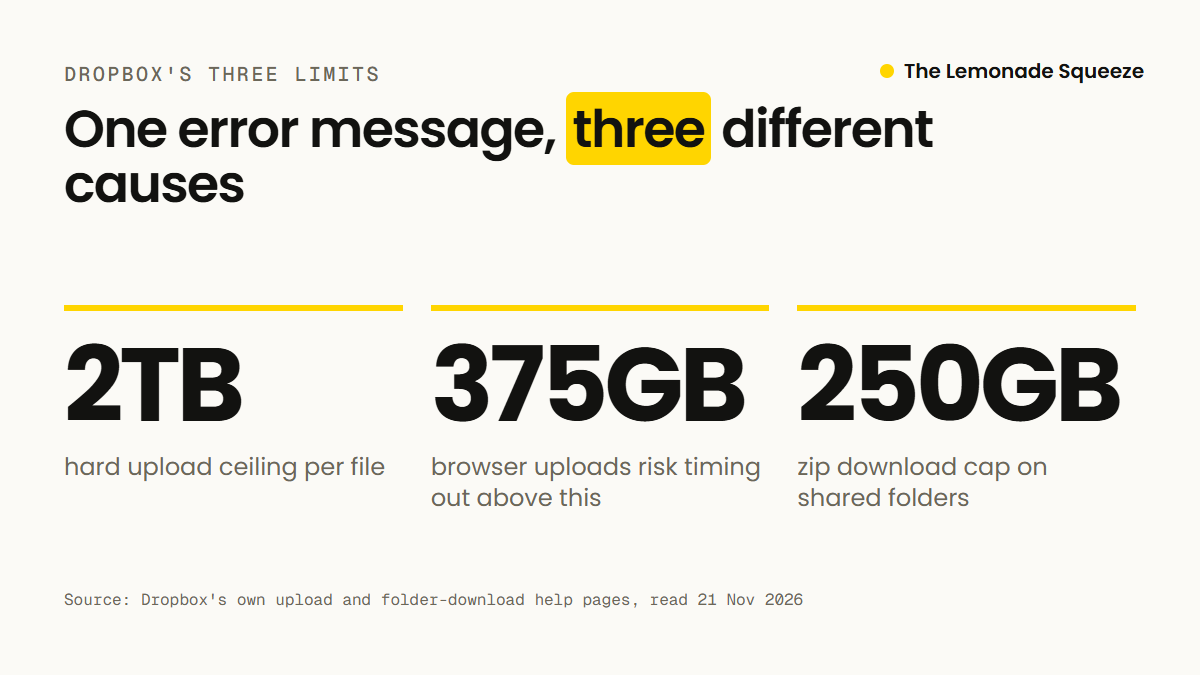
Dropbox's own ceiling is 2 TB per file, but browser uploads above 375 GB risk timing out, so Dropbox itself recommends the desktop app for anything that big.
A shared folder downloads as a zip capped at 250 GB uncompressed and under 10,000 files. That hits the recipient, not you, and uploading was never the problem.
Recurring large client transfers are better served by a dedicated transfer tool with audit trails and expiring links than by working around Dropbox every week.
A "file too large" message in Dropbox can mean one of three different things: the per-file upload cap, the zip-download cap on a shared folder, or the preview limit on a shared link. Each has its own fix, and chasing the wrong one wastes an afternoon. This guide maps each message to its real cause, then gives you the fix: split, compress, change how you download, or move the transfer to a purpose-built tool.
The upload cap applies to each individual file...

Why Does Dropbox Say My File Is Too Large to Upload When I Have Storage Space Left?
Two separate limits are at play. Storage quota measures everything in your account combined. The upload cap applies to each individual file, and you'll see the same "file too large" message even with terabytes of storage free.
Storage Quota vs Per-File Upload Cap
The quota error talks about space; the upload error talks about the file itself. If a single DWG, RVT or MP4 exceeds Dropbox's per-file cap, freeing up storage won't touch it. The two limits are independent, so check which message you're actually looking at before you start deleting old files.
Where the Cap Applies: Desktop App, Mobile App and Browser Upload
Dropbox's own help centre puts the hard ceiling at 2 TB per file (Dropbox's upload limitations help page, read 21 Nov 2026). The catch is how you upload: browser uploads risk timing out above 375 GB, so Dropbox itself recommends switching to the desktop app or API for anything past that point. Mobile uploads carry a similar risk, since phone operating systems add their own instability on large transfers. If a single DWG, RVT or MP4 is genuinely over 375 GB, that's rare for most firms, and the fix is the desktop app, not a workaround.
What's the Difference Between Dropbox's Upload Limit, Zip Download Limit and Preview Limit?
Three separate limits produce "too large" wording, and each has its own error message and fix. Treating them as one problem sends you down the wrong path.
Upload Cap on a Single File
This hits when you add a file to Dropbox. The upload stalls or fails, and the message points at the file itself. Storage space left is irrelevant: the cap is per-file, not per-account.
Download-As-Zip Cap on Shared Folders
This hits the recipient, not you. When someone downloads a shared folder, Dropbox packages it as a zip first, and Dropbox's own limit is 250 GB uncompressed and under 10,000 total files, including nested folders (Dropbox's folder download help page, read 21 Nov 2026). Your files uploaded fine; the zip step is where it breaks.
Preview Limit on Shared Links
Large files on a shared link show "file is too big to preview". Dropbox doesn't publish one blanket figure, the cap varies by file type, but downloading is unaffected either way (Dropbox's preview errors help page, read 21 Nov 2026).
Limit | Who Hits It | Error Points To | Fix Direction |
|---|---|---|---|
Upload cap | Sender | The file being added | Split, compress, or use the desktop app |
Zip download cap | Recipient | The zip package | Change download method |
Preview limit | Recipient | The preview only | Download directly instead |
How Do I Download a Large Dropbox File Without the "Zip File Is Too Large" Error?
The error comes from downloading a whole folder, which Dropbox zips before handing it over. Download files individually instead, and the zip step never happens.
Download Files One at a Time from the Shared Link
Open the shared link, select one file, and use Download. Repeat for each file you need. This works for anything that sits under the 250 GB zip cap on its own, and it's the fastest fix when you only need two or three files from a large folder. The trade-off is tedium: if the folder holds fifty drawings, clicking fifty times isn't a process, it's a workaround.
Ask the Sender to Re-Share as Individual Files
If you hit this regularly, the durable fix sits upstream. Whoever shares the folder should share files directly, or send them through a tool built for large transfers. For a firm sending DWG or RVT packages to clients weekly, that one change removes the error for every recipient, not just you.
How Do I Transfer a File That Exceeds Dropbox's Upload Size Cap?
Compress First: What DWG, RVT and MP4 Files Compress Well
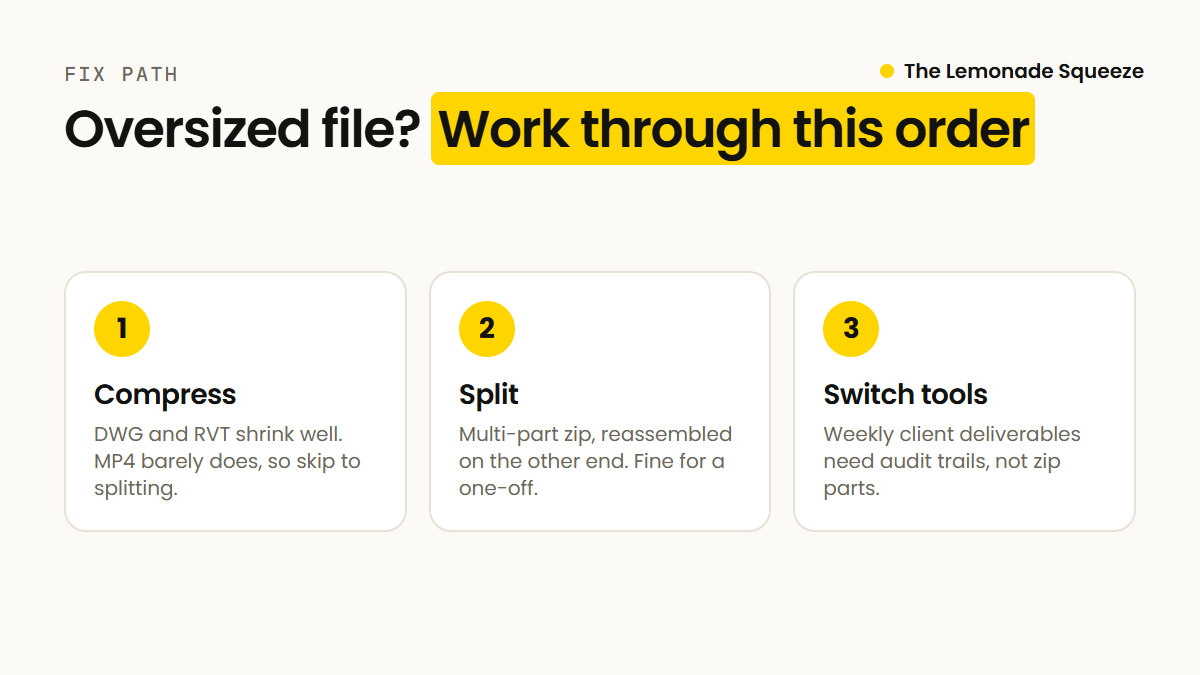
Try compression before anything else, because it costs nothing and often works. CAD and BIM files respond well: DWG and RVT files carry a lot of repetitive geometry and unused layer data, so zipping them typically cuts file size meaningfully. MP4 video barely compresses, since it's already a compressed container, so skip straight to splitting for video. Purging unused elements in AutoCAD or Revit before zipping can shrink a bloated DWG noticeably, with no loss of content.
Splitting Large Files into Parts and Reassembling
If compression isn't enough, split the file. Windows and macOS both have built-in archivers that can produce multi-part zips, and 7-Zip's split option does the same with a single command. Send all parts through Dropbox together, then reassemble on the other side by extracting the first part. The trade-off is your recipient's patience: every part has to arrive before anything opens, and one missing part means a failed transfer. Document the reassembly step in your email, because clients outside your firm won't know it.
Transfer Tools Built for Large Files: MASV, ShareFile, Files.com
When files routinely exceed Dropbox's cap, a dedicated tool removes the workaround entirely. MASV, ShareFile and Files.com are all built around sending large files with no manual splitting, each offering expiring links and audit logs that a shared Dropbox folder doesn't give you. FileFi takes the same approach: files of any size, a full audit trail of who opened and downloaded what, and links that expire on your schedule. For a UK firm sending DWG or RVT files to clients, that combination matters: the recipient clicks one link, downloads once, and your audit trail shows exactly who did what. Weigh the subscription against how often you actually hit the cap; occasional large sends may not justify it, but weekly client deliverables usually do.
Why Does the "File Is Too Big to Preview" Error Appear, and Does It Affect Downloading?
What Previews Can and Cannot Render
Dropbox previews common formats such as images, PDFs, Office documents and video, up to a size that varies by file type. Beyond it, you get "file is too big to preview". That's a viewing limit only: the file itself is intact and downloadable either way.
What to Tell Clients Who See the Preview Error
A client who hits the message often assumes the file is broken or blocked. It isn't. Tell them to click Download instead of trying to preview it, or select Download directly from the shared link. If the zip cap then becomes the problem, that's the separate limit covered above, with its own fix.
How Do File Size Limits Differ Across Dropbox Plans and Transfer Methods?
Dropbox Plans vs Dedicated Transfer Tools
Dropbox's upload cap depends on how you upload, not which plan you're on. The 2 TB ceiling and the 375 GB browser risk threshold are the same whether you're on Plus or Business; paid tiers add storage and admin features, not a higher per-file cap. Dedicated transfer tools work differently: MASV prices per GB sent with no hard file cap, and ShareFile and Files.com both treat large-file transfer as the product rather than an edge case.
Email Attachments as the Status Quo: Outlook and Gmail Limits
Email is still most firms' default, and it fails first. Gmail and Outlook.com cap personal attachments at 25 MB (Gmail's attachment size help page, read 21 Nov 2026); Microsoft 365 business mailboxes default higher, typically 35 MB, though an admin can raise it. Anything bigger bounces or gets pushed to a cloud link, which puts you back where you started. If your current workflow is email plus Dropbox, every file over 25 MB is already taking a workaround.
When Should I Split, Compress, or Use a Transfer Tool Instead of Fixing the Dropbox Error?
One-Off Fix vs Recurring Workflow
If a single file is marginally over the cap, compress it or split the archive and move on. That's a one-off fix, and spending money to avoid it makes no sense. The calculation changes when the pattern repeats: weekly RVT packages to a client, MP4 rushes from a site camera, or DWG sets that keep growing past what's comfortable to send. That's a workflow, not a one-off, and workflows need audit trails and expiring links, not zip files.
What to Check Before Switching: Audit Logs, UK Residency, GDPR Posture
Run any candidate through the same three checks. Does it log who downloaded what and when? Can you restrict links to expiry dates or passwords? Where does the data physically sit, and can the vendor state its GDPR position in writing? Ask for answers in writing, and judge on the replies, not the marketing.
What Should a UK Firm Check Before Moving Client File Transfers Off Dropbox?
GDPR and Data Sovereignty Questions to Ask Any Vendor
Ask three things in writing: where files are stored at rest (UK residency matters for client contracts), whether audit trails log every download with a timestamp and identity, and whether encryption at rest is applied to stored files, not just in transit. Get the answers as contractual commitments, not marketing copy. If a vendor can't state its data centre locations precisely, treat that as an answer.
Honest Criteria Run-Through: Where FileFi Fits
FileFi is built around exactly these criteria: two UK data centres, no file size limits, a full audit trail of every download, and encryption at rest and in transit, aimed at firms sending DWG, RVT and MP4 files to clients. It's priced at £22 per user a month, with two months free on an annual plan. Where it may not fit: if a client contract names a specific competitor, or you need a feature that isn't built yet, switching costs rarely pencil out for one awkward transfer. Weigh the subscription against how often you actually hit Dropbox's cap, not against a single bad afternoon.
FAQ
Does the "File Too Large" Error in Dropbox Mean My Storage Is Full?
No. Storage quota and the per-file upload cap are separate limits. The quota covers everything in your account combined; the upload cap applies to each individual file. If a single DWG, RVT or MP4 exceeds Dropbox's per-file cap, freeing up storage space won't fix the error.
Can I Increase the Dropbox Upload Size Limit Without Upgrading My Plan?
Not by upgrading your plan, since the cap depends on how you upload rather than what you pay for. Dropbox's hard ceiling is 2 TB per file; browser uploads just risk timing out above 375 GB, so switching to the desktop app is what actually helps, not a higher-tier plan. Compressing the file, splitting it into parts, or using a dedicated transfer tool with no size cap all work too.
Why Can My Client See a Shared Dropbox Link but Not Download the Folder?
They're hitting the download-as-zip cap, a limit on the recipient's side. Dropbox packages a downloaded folder as a zip, and Dropbox limits that zip to 250 GB uncompressed and under 10,000 files. The files themselves uploaded fine. The fix is changing the download method: download files individually, or have the sender share files directly rather than as a folder.
Is It GDPR-Compliant to Send Client DWG Files Through a File Transfer Service?
Yes, provided the vendor meets your requirements. Ask three things in writing: where files are stored at rest, whether audit trails log every download with a timestamp and identity, and whether encryption applies to stored files, not just transfers. Get the answers as contractual commitments rather than marketing claims before sending anything.
What Is the Maximum File Size for a Dropbox Transfer Link?
Dropbox's own ceiling is 2 TB per file. The practical limit is lower for browser uploads, which risk timing out above 375 GB, so Dropbox recommends the desktop app for anything that large. If you regularly send multi-gigabyte files, a dedicated transfer tool built around large files is the steadier option.