
File Sharing for Business: Choose by Team Size
TL;DR
Team size, not a feature matrix, determines what you need from file sharing: audit trails and admin controls become essential once more than one person sends client files.
Email caps out at 25 MB in Gmail and as low as 10 MB on some Microsoft 365 mailboxes, so any DWG, RVT or MP4 deliverable needs a dedicated tool with no practical file size ceiling.
If a provider stores or processes data outside the UK, the ICO's international transfer rules apply, so verify data residency and exportable audit logs before signing.
WeTransfer is fine for a one-off send but risky as a default channel because it offers no audit trails, admin oversight or control over where client files reside.
Run any new tool, FileFi included, through a one-week pilot on a live project with a fallback such as MASV for time-critical transfers.
The right file sharing for business depends more on your team size than on any feature matrix. A two-person studio sending DWG files to clients needs expiring links and UK data residency; a 25-person firm also needs audit trails and admin controls. This guide maps those requirements to team sizes, then runs shortlisted tools, including our own FileFi, through the same criteria.
What Does Your Team Size Actually Change About File Sharing?
The mechanics of sending a 2GB DWG file barely change between a two-person studio and a 25-person practice. What changes is accountability. A solo architect can email a client and call it done; the moment a second person touches the file, you need to know who sent it, to whom, and when, because you are accountable for client data under UK GDPR.
That is why a flat top-10 list fails SMEs. It ranks features you may never use while skipping the ones that scale with headcount: audit trails, admin controls, expiring links, and where your data physically sits. If a provider stores or processes data outside the UK, the ICO's rules on international transfers apply, and that constraint alone eliminates several popular options before you compare anything else. The rest of this guide maps requirements to team size, then runs a shortlist, including our own product at FileFi - Professional File Sharing, through the same criteria.
Which Requirements Matter at Each Team Size?
The requirements that change with scale are audit trails, admin controls, expiring links, and where data physically sits. Encryption at rest and no file size limits matter at every size. The table below is the framework the rest of this guide runs tools through.
Requirement | Solo / 2-5 | Under 20 | 20-100 |
|---|---|---|---|
Encryption at rest + in transit | Yes | Yes | Yes |
No file size limits (DWG, RVT, MP4) | Yes | Yes | Yes |
Expiring links to clients | Useful | Yes | Yes |
Audit logs per file | Useful | Yes | Yes |
UK data residency | Yes if clients require | Yes | Yes |
Admin controls, user roles | Optional | Yes | Yes |
SSO / provisioning | No | Optional | Yes |
Solo or 2-5 Staff
You can often get away with a single account and good habits: encrypted transfer, expiring links, and a log of what you sent and when. If a client contract specifies UK data residency, that constraint applies from day one, not at some headcount threshold.
Under 20 Staff
This is where shared responsibility breaks down. Several people send client files, so you need per-file audit logs and the ability to revoke access when someone leaves. Admin controls stop being optional.
20-100 Staff
Add role-based permissions, SSO if your identity provider supports it, and retention policies you can show an auditor. At this size the question shifts from "can we send it securely" to "can we prove we handled it correctly."
What Should an AEC Firm Check Before Sending Large Files to Clients?
Four checks cover most of it. First, size limits: Gmail caps attachments at 25 MB and Microsoft 365 mailboxes can be as low as 10 MB by default, which rules out almost every DWG, RVT or MP4 you would send a client, so any tool you adopt needs no practical ceiling (Outlook.com sending limits). Second, expiring links: client shares should die on a date you choose, not live in an inbox forever.
Third, audit logs. When a client asks who downloaded the Revit model and when, you need an answer without reconstructing it from memory. Fourth, GDPR handling: client data should sit on UK or adequately protected infrastructure, with encryption at rest and a processor agreement you can actually review.
Run FileFi through the same checks honestly: no file size limits, expiring links, a full audit trail and two UK data centres are built in, but as a newly launched product it has less third-party validation than ShareFile or Files.com, so pilot it with a low-risk client project first.
How Do the Shortlisted Tools Compare Against the Framework?
ShareFile
ShareFile (Progress Software) targets exactly your profile: professional services firms sending large files to clients, with audit trails and admin controls built in. It is the most feature-complete option on this list, and the price reflects that. If you need client portals and integrations with practice software, it is the default answer.
MASV
MASV is built for large creative and AEC files, priced per GB of transfer rather than per seat. That model suits occasional multi-gigabyte sends of DWG, RVT or MP4 files without a monthly commitment. It is lighter on admin controls than ShareFile, so check whether its audit features match your GDPR record-keeping needs.
Files.com
Files.com sits between the two: a general-purpose secure file sharing platform with audit logs, user permissions and automation. It is a strong fit if file sharing is becoming workflow infrastructure rather than an occasional send. Expect more setup time than MASV.
WeTransfer
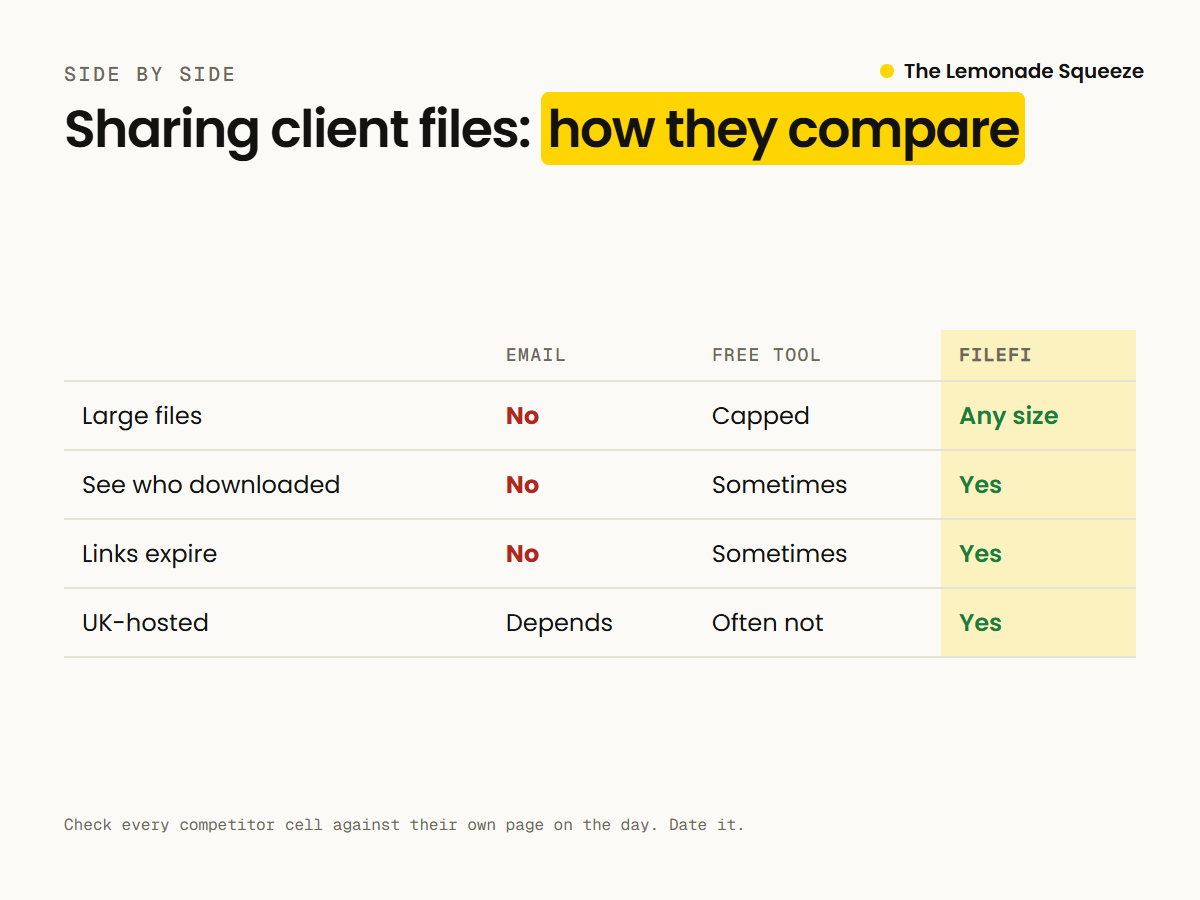
WeTransfer is the adjacent option most teams already use. It is fast and familiar, but it is not built for business accountability: no audit trails, no admin oversight, and no guarantee about where your client files reside. Fine for a one-off, risky as your default channel.
FileFi
The honest test of any framework is running your own product through it. FileFi launched out of private beta on 29 October 2026: no file size limits, a full audit trail of who opened and downloaded each file, expiring links, two UK data centres, and encryption at rest and in transit, priced at £22/user/month for a 2-25 person firm rather than enterprise seat pricing.
Where it's lighter than ShareFile or Files.com today is track record: both have years of enterprise deployments behind them, FileFi has weeks.
If your procurement rules require an established vendor history, that's a fair reason to wait or choose one of them.
If your priority is UK data residency and a full audit trail at a small-firm price, it's worth running through the four-week pilot below - the founder code FOUNDER30 covers a discount until 1 December 2026 along with a 30 day free trial so you and your team can use it and see how it fairs.

Is Email Still Good Enough for Small Business File Sharing?
For a quick contract PDF or a spreadsheet under 25 MB, yes. Gmail's attachment limit is 25 MB per message, and anything larger gets swapped for a Google Drive link (Gmail Help). If your client is happy with a Drive link and there's nothing confidential in the file, that workflow is genuinely fine.
It breaks down when the file is a 2 GB RVT model or a 400 MB MP4 walkthrough. Zipping rarely helps: DWG and RVT files are already compressed, so a zip saves little and still hits the limit. And the Drive-link fallback means you're sharing through a consumer account with no audit trail, no expiry control, and no record of who downloaded what. For client deliverables, that gap is the problem.
What About Peer-To-Peer Tools Like Resilio and Syncthing?
Peer-to-peer tools earn their reputation. Resilio Sync and Syncthing move files directly between machines you control, with no size limits, and Syncthing is free and open source. For syncing project folders between your own office machines and a site laptop, they are hard to beat.
The gap appears when the other end is a client. Both ends need the software installed and running at the same time, which means asking a client to set up an account for your convenience. There is no expiring link, no audit trail showing who downloaded what and when, and no admin console for revoking access when someone leaves the firm. Those are the requirements that matter for client-facing sharing under GDPR, and they are what a hosted service like FileFi exists to cover.
How Should You Handle GDPR and UK Data Residency When Choosing a Service?
Before signing anything, verify four things: where files are stored, whether encryption at rest is on by default, whether audit logs exist and can be exported, and whether a data processing agreement is offered. UK data residency matters if you want client files governed by UK law and the ICO rather than a foreign jurisdiction, and it simplifies your records of processing. Ask vendors directly: "Where is data stored, can you sign a DPA under UK GDPR, and can I export audit logs?" If answers are vague, walk away.
The ICO's international transfers guidance sets out what a valid transfer looks like, and it is the standard to hold vendors against. Run FileFi through the same questions: two UK data centres and a full audit trail are core features, not add-ons. If a DPA matters for your contract, ask for it when you set up a trial.
What Is a Sensible Rollout Plan for a 2-25 Person Firm?
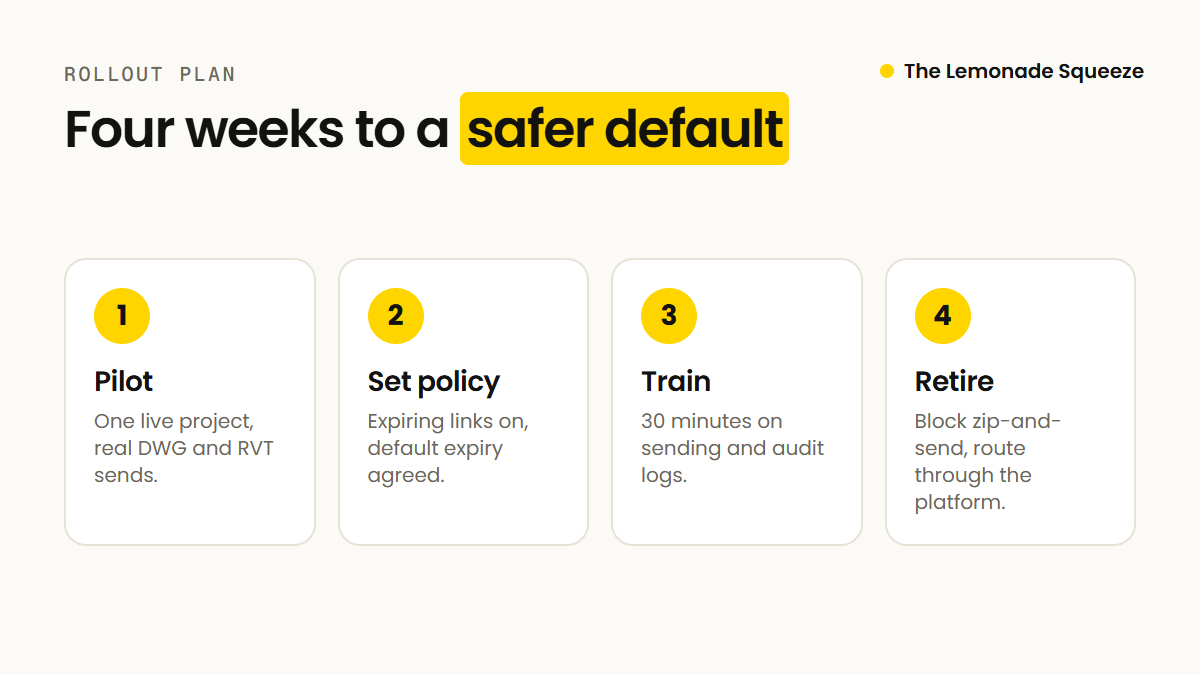
Week 1: pilot on one live project. Pick a job with real client transfers, have two or three people send actual DWG and RVT files through FileFi, and note anything that slows them down. Keep email and existing tools running in parallel so nobody is blocked.
Week 2: set policy. Turn on expiring links for all client shares, decide the default expiry (seven days suits most AEC work), and check audit trails capture who downloaded what and when. If you need UK data residency for client contracts, confirm it is switched on before the pilot widens.
Week 3: train the team in a 30-minute session covering sending, link expiry, and where audit logs live. Name one person as admin.
Week 4: retire the workarounds. Block zip-and-send attachments over the email limit, and ask project leads to route client files through the platform. Review the audit trail after the first month and adjust expiry defaults to match client expectations.
Caveat: FileFi only came out of private beta in late October 2026, so run the pilot against your actual contractual requirements before committing, and keep a fallback such as MASV for anything time-critical during rollout.
FAQ
How Can I Securely Send Files Ranging from 1MB to 1TB to Clients?
Use a service with no practical file size ceiling, encryption at rest and in transit, expiring links, and audit logs. Gmail caps out at 25 MB, so anything larger needs a dedicated tool. ShareFile, MASV, Files.com and FileFi all handle multi-gigabyte DWG, RVT or MP4 files; pick based on your accountability needs and team size.
What Is the Best Cloud File Sharing for Small Business on a Tight Budget?
For a 2-5 person firm, a single account with encrypted transfer and expiring links may be enough. MASV suits occasional large sends because it prices per GB rather than per seat. FileFi is priced at £22/user/month for 2-25 person firms with UK data centres and a full audit trail built in, though it only launched in late October 2026, so pilot it before committing.
Do I Need UK Data Residency or Is EU Hosting Enough for GDPR?
EU hosting can be GDPR-compliant, but UK residency keeps client files governed by UK law and the ICO, simplifying your records. If a provider stores or processes data outside the UK, the ICO's international transfer rules apply. Ask vendors directly where data sits, whether they sign a DPA under UK GDPR, and whether audit logs are exportable.
Is WeTransfer Suitable for Business Use or Only for Casual Sharing?
Fine for a one-off, risky as your default channel. It is fast and familiar, but it offers no audit trails, no admin oversight, no expiring links you control, and no guarantee about where your client files reside. Once several people send client files, those gaps matter under UK GDPR, so route deliverables through a proper platform instead.