
Nextcloud 413 'The File Is Too Large': Fix at Every Layer
TL;DR
- A Nextcloud 413 error comes from whichever layer rejects the upload first: nginx's
client_max_body_size, Apache'sLimitRequestBody, PHP'supload_max_filesize, or Cloudflare's 100MB cap. - Raising PHP's
upload_max_filesizealone fixes nothing unless nginx or Apache's limits are raised to match, andpost_max_sizemust be at least as large asupload_max_filesize. - Cloudflare's Free and Pro plans reject any request body over 100MB at the edge, so chunks need to stay under that or the upload subdomain needs to bypass the proxy.
- Config locations differ by deployment: snap uses
sudo snap set nextcloud php.upload-max-filesize, Docker takesPHP_UPLOAD_LIMITas an environment variable, and bare metal uses the php-fpm pool file. - Revit, DWG and MP4 files are already dense binary formats, so zipping saves only a few percent. Fixing the layer limits or splitting into volumes works better than compressing.
A "413 the file is too large" error in Nextcloud is almost never caused by PHP alone. It comes from whichever layer rejects the upload first: PHP's upload_max_filesize, nginx's client_max_body_size, Apache's LimitRequestBody, Cloudflare's 100MB ceiling, or a mismatch in how the file is chunked. This guide walks through each layer in order, with config snippets for Docker, snap and bare metal deployments, so you can find the one that's actually failing and fix it.
Why Does Nextcloud Return 413 'The File Is Too Large' Even When Upload_max_filesize Is Raised?
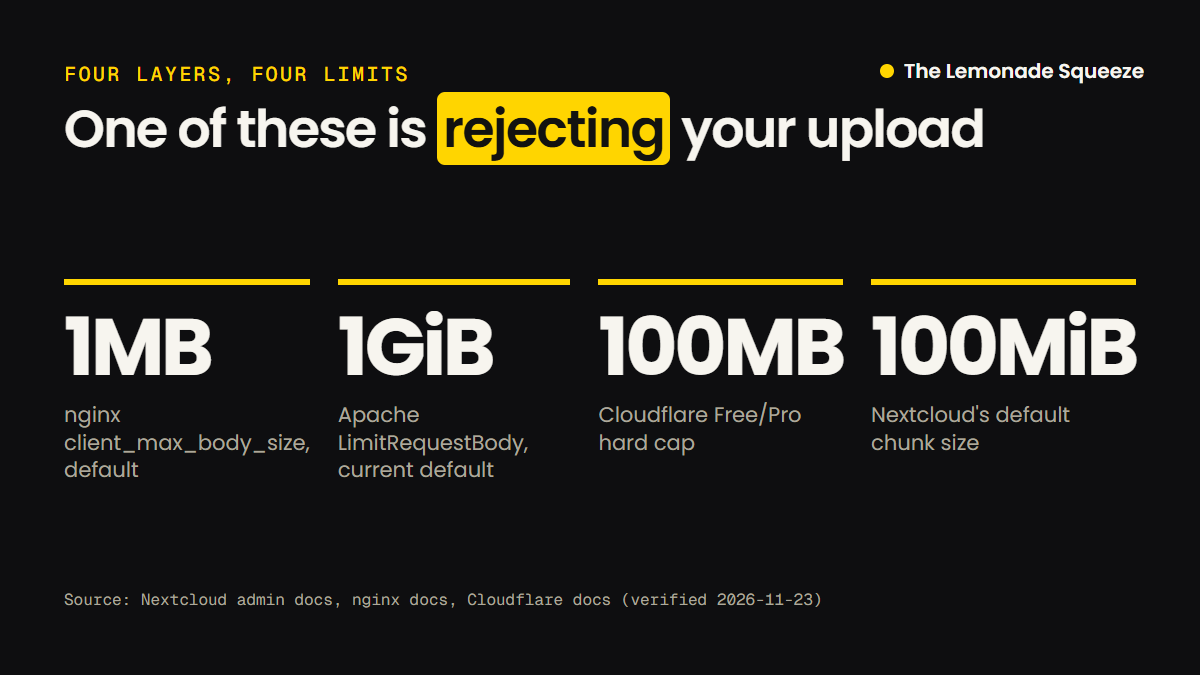
A 413 is sent by whichever layer rejects the upload first, so raising PHP's limit on its own often changes nothing. Four layers can reject a large upload before it ever reaches Nextcloud's storage: the reverse proxy (nginx's client_max_body_size or Apache's LimitRequestBody), PHP (upload_max_filesize and post_max_size), Cloudflare's 100MB limit on proxied requests, and Nextcloud's own chunking settings. Nextcloud sidesteps some of this by splitting uploads into chunks, but only if the chunk size in config.php is set below the limits of every layer above it. Nextcloud's own admin documentation covers the full chain of settings. If chunking is off, or the chunk is still too large, the first restrictive layer wins, and the error message never tells you which one it was. That's the diagnosis the rest of this guide untangles, and if keeping that chain working becomes more effort than the file sharing itself, a hosted option like FileFi removes the stack entirely.
Which Nginx and Apache Directives Must Change Alongside PHP Limits to Fix 413?
413 is usually the web server cutting the connection before PHP ever sees the file. Raising upload_max_filesize alone does nothing if nginx or Apache rejects the request body first. All three layers need to agree on a limit higher than your largest file.
Nginx
Set client_max_body_size in the server block (or the relevant location block) of your Nextcloud vhost, then reload nginx. Nginx's own default is a tight 1MB, so this almost always needs raising:
client_max_body_size 10G;If a reverse proxy sits in front of Nextcloud, it needs the same directive, because the request passes through both. A mismatch means the front server returns 413 while the backend is configured correctly.
Apache
Apache uses LimitRequestBody. Current Apache 2.4.x builds default this to 1 GiB; older builds often defaulted to 0 (unlimited), so check your version before assuming either way:
LimitRequestBody 10737418240Place it in the vhost or .htaccess and restart Apache.
PHP Settings and Where to Set Them
Set these in php.ini or, for FPM, in the pool's conf.d file, then restart the PHP-FPM service:
upload_max_filesize = 10G
post_max_size = 10G
memory_limit = 512M
post_max_size must be at least as large as upload_max_filesize, or uploads fail silently. Where the file lives depends on your deployment: bare metal uses the global php.ini, the snap ships its own PHP, and Docker images take PHP_UPLOAD_LIMIT as an environment variable. Run php -i | grep upload on the host to confirm which file is actually loaded, since editing the wrong one is the most common reason a limit looks unchanged after a restart.
How Does Cloudflare's 100MB Upload Limit Cause 413, and What Are the Workarounds?
If Nextcloud sits behind Cloudflare's proxy, the Free and Pro plans reject any request body over 100MB before it reaches your server. The response is a 413 or a Cloudflare-branded error page, and no amount of raising upload_max_filesize or client_max_body_size fixes it, because the rejection happens at Cloudflare's edge.
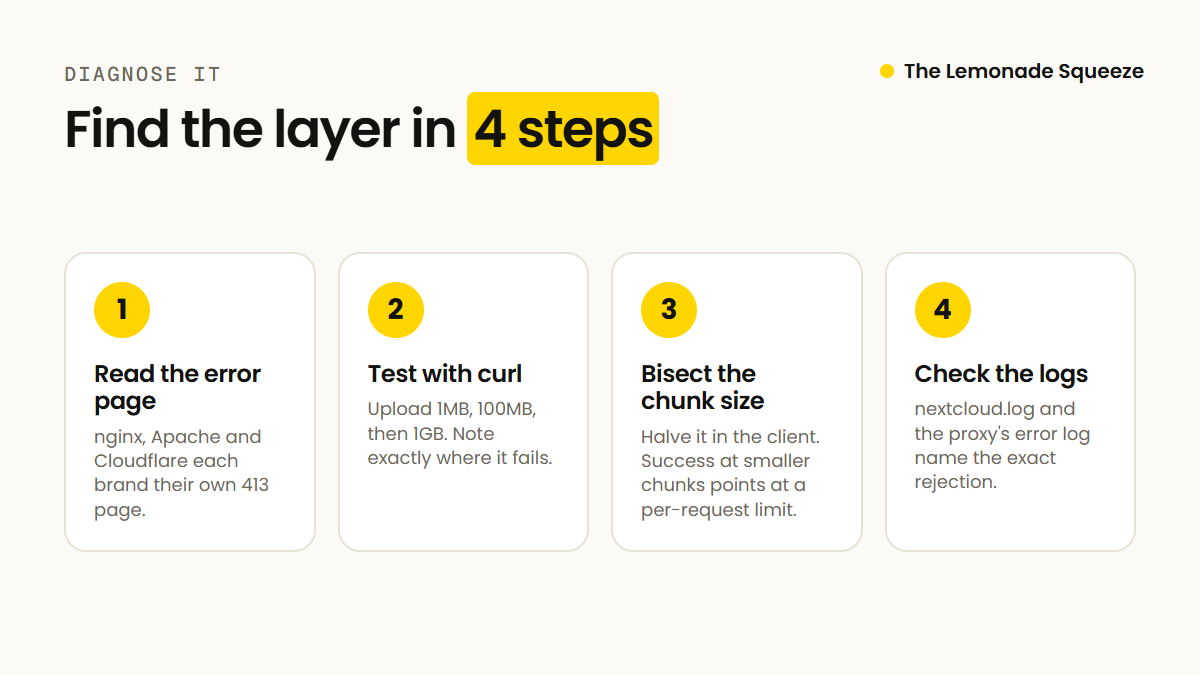
Confirm Cloudflare is the layer by checking whether the 413 arrives within a second or two from any network, and whether the error page carries Cloudflare's branding. You can also grey-cloud the subdomain temporarily to test direct access.
Three workarounds:
- Keep Nextcloud's client-side chunk size under 100MB, so no single request trips the limit.
- Grey-cloud the subdomain used for uploads, routing that traffic around Cloudflare's proxy.
- Move to an Enterprise plan for a higher limit, which is rarely proportionate for a small firm.
If none of those fit, hosting the files outside the proxy is the honest answer.
How Do Client-Side Chunking Settings Interact with the 413 Error?
Nextcloud splits uploads into chunks, and the chunk size setting in config.php controls how big each piece is (Nextcloud's documented default is 100 MiB, with 0 disabling chunking). When chunking works, each request is small enough to pass PHP and reverse-proxy limits that would reject the full file. A 413 on a 2GB RVT file usually means a limit is being checked against the whole file, not the chunk.
Three things break that protection. First, if chunking is disabled, uploads go through as single requests and every layer limit applies to the whole file. Second, the iOS app and some older desktop client versions handle chunking differently, or not at all, so a file that uploads fine from the web UI can still trigger a 413 from a phone. Third, if the chunk size is raised above your nginx client_max_body_size or Cloudflare's 100MB cap, the chunk itself becomes the oversized request.
Keep chunks comfortably below your smallest layer limit, and test from every client type your team actually uses.
How Do You Fix 413 in Nextcloud Snap and Docker Deployments Specifically?
The error looks the same everywhere, but the file you edit depends entirely on how Nextcloud is installed.
Snap (Ubuntu)
Snap packages are self-contained, so system-wide PHP settings are ignored. Raise the limits through the snap's own occ wrapper:
sudo snap set nextcloud php.upload-max-filesize=10G
sudo snap set nextcloud php.post-max-size=10G
Restart with sudo snap restart nextcloud.apache and sudo snap restart nextcloud.php-fpm.
Docker (Official Image)
Mount a custom php.ini into the container and pass limits as environment variables:
docker run -e PHP_UPLOAD_LIMIT=10G -e PHP_MEMORY_LIMIT=512M \
  -v ./php.ini:/usr/local/etc/php/conf.d/uploads.ini nextcloud
Your mounted uploads.ini sets upload_max_filesize, post_max_size and memory_limit. If nginx or Apache sits in front of the container, its own client_max_body_size or LimitRequestBody must match, or the proxy rejects the request before Nextcloud sees it.
Bare Metal / Php-Fpm
Edit the pool file (/etc/php/*/fpm/pool.d/www.conf) or a conf override with the same three PHP directives, then systemctl reload php*-fpm. Add LimitRequestBody to the Apache vhost if one is present.
| Deployment | Where the config lives | Restart |
|---|---|---|
| Snap | Snap's own occ wrapper, not system php.ini | snap restart |
| Docker | Mounted php.ini plus environment variables | Recreate container |
| Bare metal | php-fpm pool file plus Apache vhost | Reload fpm |
When Should You Compress or Split Files Instead of Raising Upload Limits?
What Compresses Well, and What Does Not
MP4 is already compressed, so zipping it saves a few percent at best. DWG and RVT behave similarly, because they're already dense binary formats, so a Revit workshared model or a large CAD bundle barely shrinks either way. If a file is still too large after fixing PHP, nginx and proxy limits, compression won't rescue it.
Splitting works better for CAD bundles. A zip split into 2GB parts, or 7-Zip's volume feature, gets past any limit, but the recipient has to reassemble the parts, and one corrupted volume fails the whole set. For a 1GB DWG going to a client, that's friction you pay every time.
Alternatives When the Stack Itself Is the Bottleneck
If limits need tuning every few weeks, a dedicated file transfer service is usually the honest fix. That's the problem FileFi is built for: files of any size, a full audit trail of who opened and downloaded what, links that expire, and two UK data centres, encrypted at rest and in transit, so DWG and RVT files reach clients without a proxy config in the loop.
FAQ
I Set Client_max_body_size to 0 but Uploads Still Fail at 413. What Else Can Limit the Body Size?
With client_max_body_size set to 0, nginx stops limiting the body, so the rejection is coming from another layer. Check PHP's upload_max_filesize and post_max_size, Apache's LimitRequestBody if Apache sits anywhere in the chain, and Cloudflare's proxy if you use it. A front proxy with its own default limit is a common culprit.
Does the Nextcloud iOS or Android App Show "The File Is Too Large" for a Different Reason Than the Web UI?
Yes. The mobile apps handle chunking differently from the web UI, and some versions don't chunk at all, so the full file goes as a single request. A 2GB upload that succeeds in the browser can then hit every layer limit at once from a phone. Test from each client type your team uses.
Where Is the PHP Config in a Nextcloud Snap Installation?
Snap bundles its own PHP, so the system-wide php.ini is ignored. The practical route is the snap's own settings: sudo snap set nextcloud php.upload-max-filesize=10G and the matching php.post-max-size key, then restart with sudo snap restart nextcloud.php-fpm.
Can I Raise the Cloudflare 100MB Limit Without Moving to Enterprise?
No. The 100MB per-request cap on Free and Pro plans is fixed at Cloudflare's edge, and no server-side setting changes it. The options are keeping chunk sizes under 100MB, grey-clouding the upload subdomain so traffic bypasses the proxy, or moving to Enterprise, which rarely makes sense for a small team.
Will Compressing a Revit or DWG File Before Upload Actually Reduce Its Size Much?
Barely. Revit and DWG files are already dense binary formats, so zipping typically saves only a few percent, and MP4 behaves the same way. Splitting into 2GB volumes with 7-Zip gets past a limit, but the recipient has to reassemble the parts, and one corrupted volume fails the set. Fixing the actual limit works better than compressing around it.

If tuning four different config files every time someone needs to send a big file sounds like a lot, it probably is. 🍋