Zapier or Custom Code? How to Choose (And What It Costs)
TL;DR
- Zapier is the fast, cheap route for a simple handoff between two systems, and it's genuinely the right answer for plenty of UK small businesses.
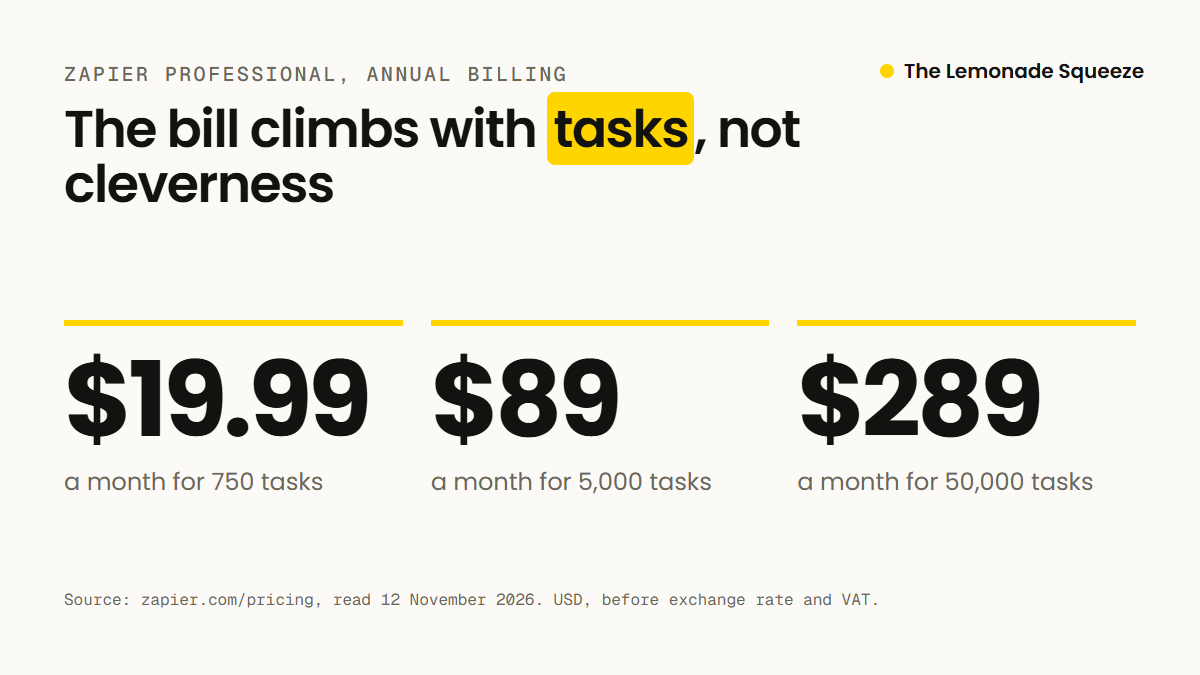
- Cost scales with every action in every run, not with how clever the workflow is. Zapier's own pricing page (read 12 November 2026) lists Professional at $19.99 a month for 750 tasks on annual billing, rising to $289 a month for 50,000.
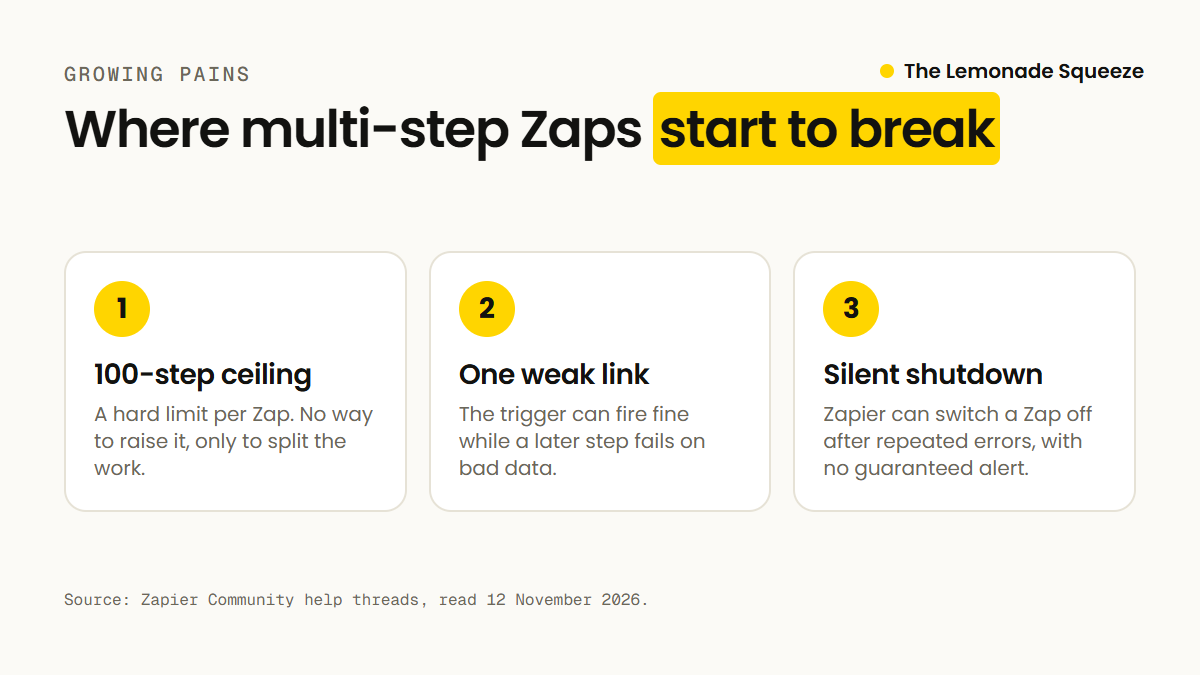
- Multi-step Zaps get fragile as they grow: there's a hard 100-step ceiling per Zap, and Zapier can switch a Zap off automatically after repeated errors, sometimes before you notice anything's wrong.
- A small custom bridge tends to pay back once you need two-way sync, your own validation rules, or visibility that Zapier's run history doesn't give you, not because no-code tools are bad.
- Ask two questions before you pick either one: how many tasks a month, realistically, and do you need to know exactly why something failed, not just that it did.
Zapier is the right choice for plenty of setups, right up until volume or visibility starts to matter more than price.
If you're connecting two systems for the first time, start with Zapier (or Make). It's quick to set up, you don't need a developer, and you can see results the same afternoon. The question worth answering before you commit further spend is what happens once that one Zap becomes five, and each one runs hundreds of times a month.
What Zapier Actually Costs at Your Volume
Zapier's pricing page, read 12 November 2026, shows a Free plan (100 tasks a month, two-step Zaps only), then Professional starting at $19.99 a month on annual billing for 750 tasks, with higher task bands sold on the same plan: $49 for 2,000, $89 for 5,000, $129 for 10,000, and $289 for 50,000. Prices are in US dollars on Zapier's own page, so budget for the exchange rate and VAT on top, not a GBP figure.
The bit that catches people out is what counts as a task. It's every action in every run, not every Zap. A simple three-step workflow ("new lead, create CRM record, send email") run 500 times a month is 1,500 tasks, not 500. That's how a business expecting to pay $20 a month ends up on the $49 or $89 tier within a quarter, without changing what the automation does.
Go over your plan's allowance and Zapier still runs your Zaps, but overage tasks cost 1.25 times the normal rate on annual billing and 2.5 times on monthly billing, up to three times your plan's allowance. None of this makes Zapier bad value. It makes it a tool whose bill you should actually forecast once you're past one or two simple Zaps, rather than finding out at renewal.
Where Multi-Step Zaps Start to Break
The cost isn't the only thing that changes with scale. The reliability does too.
Every Zap has a hard limit of 100 steps, and Zapier's own community confirms there's no way to raise it; the workaround is splitting the logic into separate Zaps or folding steps into a single code block, which trades simplicity for more moving parts. A workflow that started as "new lead in, email out" can get there faster than you'd think once you add branching, formatting and a couple of conditional checks.
Multi-step Zaps are also only as solid as the weakest step in the chain. A trigger can fire perfectly and a later step still fail, because the data it receives is missing a field or formatted differently than expected. Zap History shows that a step failed, but not always why it mattered to the business, so working out whether a lead was actually followed up, not just that the Zap "ran", often means checking by hand.
And Zapier can turn a Zap off on its own after repeated errors from a connected app, with no guaranteed warning beyond the Zap History log. For an internal reminder, that's a nuisance. For something a customer notices, like a booking confirmation or a review request, a silently disabled Zap can run for weeks before anyone spots the gap.
When a Custom Bridge Pays for Itself
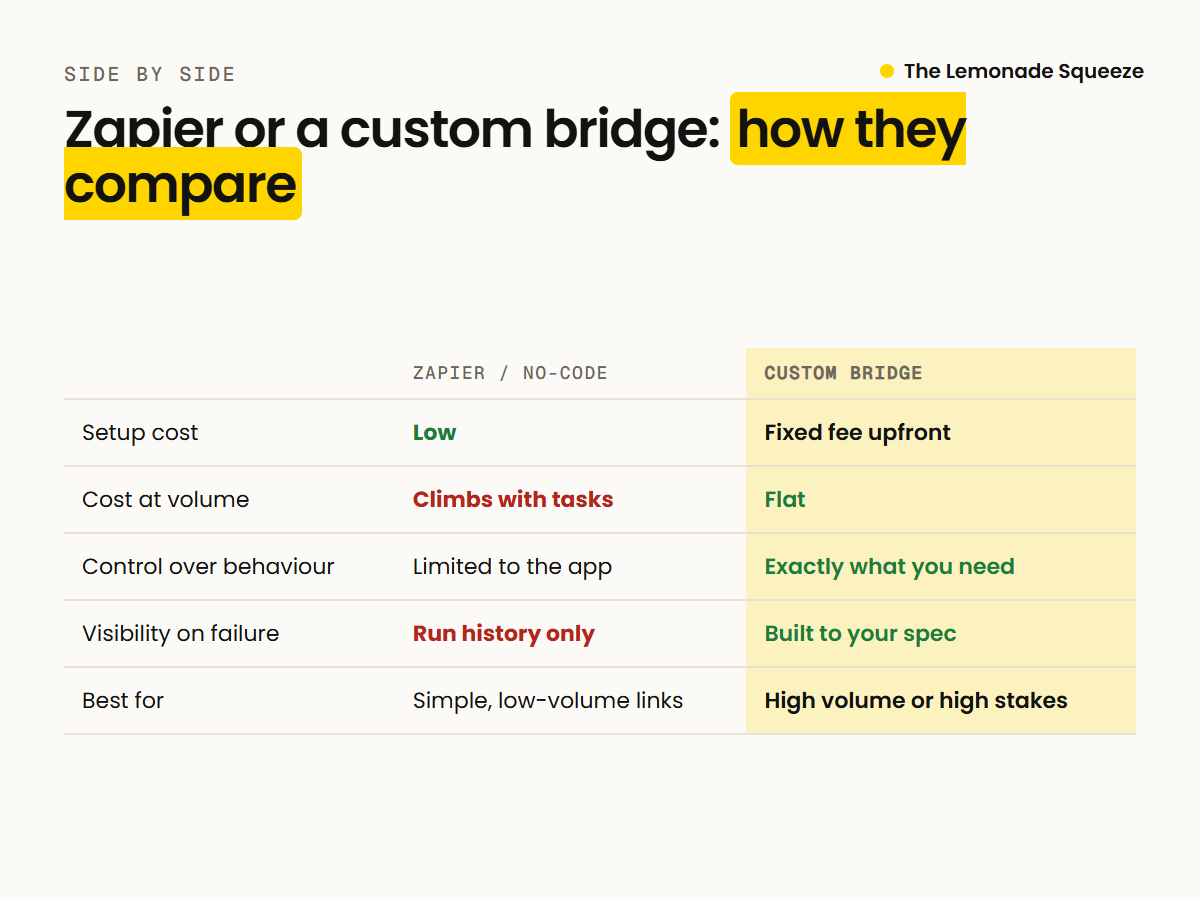
A small custom bridge is a different trade, not a better version of Zapier. You give up the drag-and-drop setup and pay more upfront, in exchange for exactly the behaviour you specify, including the error handling and visibility a general-purpose tool won't build just for you.
It tends to pay back in three situations. First, volume: once your task count is consistently in the thousands a month, a fixed-fee or fixed-cost build can undercut an ongoing subscription that keeps climbing with it. Second, control: if you need two-way sync, custom validation, or your own simple dashboard showing what happened and why, that's closer to a small piece of software than a workflow, and no-code tools aren't built to show you that level of detail. Third, risk: if a silent failure would cost you a customer, not just a few minutes, it's worth paying for something that tells you when it breaks rather than finding out from the customer first.
We scope this kind of work with a fixed discovery fee, credited back against the build if you go ahead, so you get a real number before you commit to anything. A single, clearly defined connection, pulling data from one system into another on a schedule, is usually a fixed-fee job measured in days. Anything needing ongoing two-way sync or its own admin screen is a bigger build, priced in sprints rather than one fee, because at that point it's software, not a bridge.
Most businesses we talk to haven't actually counted their monthly tasks or costed out what a failed automation would cost them if nobody noticed for a week. That's usually the first useful number to find, whichever route you end up on. 🍋